So you’re publishing posts… But are they accessible posts?
And we’re back with another edition of my new Five Fast Ways series. In this series, I give you 5 quick, simple, habit-forming things that you can do to make your life a little easier. Today, we’re talking about how to create accessible posts, be that on Instagram or on your blog.
Why you should have accessible posts
If you have any sort of public platform, one can only assume that you’re trying to reach as many people as possible. In order to do this, you should be focusing on making sure that your posts are accessible. This way people with different accessibility needs or wants are still able to access your content just as anybody else would. If, like me, you’re writing from a point of privilege, you may have never really thought about whether your content can be easily accessed by these with different needs. So, here are five fast ways to create more accessible posts.
Five fast ways to create accessible posts
I want to preface this by stressing that, again, I am writing from a privileged position where I have no real accessibility needs. Therefore, if I have gotten any of this wrong or I’m using language that I shouldn’t be, feel free to (politely) let me know in the comments. I’m still learning all the time, these are just things I have been trying to do and feel that others could also do easily.
1) Alt tag your images
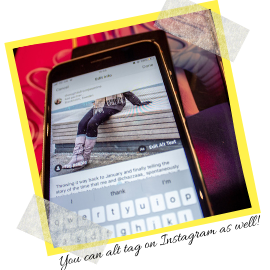
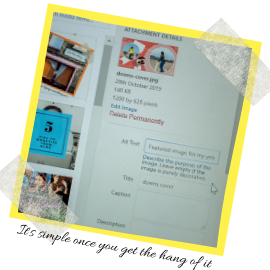
For ages, I had absolutely no idea what an Alt tag was or why it was important. All that I knew is that websites kept telling me to alt tag my images for good SEO. Whilst that may be good and probably does make a difference with Search Engine Optimisation, it’s also a great accessibility feature. Every time you upload an image to your blog or Instagram (Yes, you can alt tag on Insta too), you should be using the alt tag feature to describe the image/note any text or figures on the image, so that the visually impaired understand what’s happening.
2) Subtitle your Instagram stories
I started doing this ages ago, and whilst it takes a minute, I believe that it’s so important. If you’re going to film yourself talking, it takes a few moments to listen back to it and write out what you’re saying for those with hearing difficulties. Yes, at first it may seem time-consuming. And yes, it’s not the most fun task in the world. However, if we have time to edit our Instagram photos before we post them, then we have time to subtitle our Instagram stories and create more accessible posts. It may also up your Instagram story engagement. For example, if I’m out and watching Instagram stories, I instantly skip through those that aren’t subtitled because I know I won’t be able to hear them.
3) Differentiate your links from the rest of your text
I cannot remember the exact reasoning for this. However, about 6 months ago I saw someone do a thread on Twitter about making sure that your blog theme was accessible and this was one of their tips, so I’ve been using it ever since. If you can make your links a starkly different colour from the rest of your text then make sure that you do. However, if your theme does not allow you to do this (My old one wouldn’t let you change the colour of links), then get creative. For example, you could underline or bold all your links.
4) Be cautious of your text colour and background colour
It can be incredibly tempting to go overboard with the customisation of your website and throw in funky background and text colours. By all means, do – let your creativity fly! However, make sure that there is stark contrast between your text and background colour. Some people find it hard to discern certain colours from others. Therefore, to make it easy for them, make sure that the text would be easy to make out. A white background and black text is an obvious, clear choice. However, if you really want to mix it up, try and stick to a light background and a very dark, different text colour.
5) Consider the language that you use
This is one I do not yet actively do, but have been trying to do a lot more. As we all know, we are (slowly) becoming more progressive as a society, and we know far more about different identifiers than we did before. Therefore, when writing a post, it is worth asking yourself whether your language is inclusive enough. Obviously, sometimes your posts will be targeted towards certain groups of people and this won’t apply. However, with more general posts, it’s worth keeping in mind.
And we’re done! Hope you enjoyed the next edition of this series. I won’t lie, I’m quite enjoying writing them. Good luck with writing your own accessible posts, and let me know if you have any tips of your own in the comments!
I love that you’re sharing the need for accessibility with publishing content. I always try my best to add an alt tag to my images. I always make my URL’s a different color to emphasize that there is an embedded content. OK, I always have a hard time reading content when there is a black background with light text. Thanks for sharing all of these tips!
Alt tags! I always knew they were important but it was always something I’d skip if I was hurrying to finish something. Not these days, i try my best to write mini essays now, although I find it hard sometimes. This is a photo of granola on a baking tray. This is another photo of the same granola on the same tray from a slightly different angle ?. I think language choices are a difficult one because you want to be inclusive but also want to sound like yourself. Really interesting read x
Yeah I also start struggling too, especially when I have loads of pictures of the same thing from different angles! Language choices are definitely the ones I struggle with the most, mainly because, like you, I try to be true to my writing style and sound natural. Glad you enjoyed it! xx
These are some really great tips! I definitely need to start doing alt text more on my blog and Instagram, I just always seem to forget to do it but I will now! X
Love this! I always alt tag my images, but perhaps not as well as I could be doing. A simple black and white outlay has always worked well for me, other colors often teasing the text. Thanks for sharing.
I’m not even going to lie, I always forget to alt tag my images but I definitely need to go through my posts and start adding it in. When people don’t subtitle their Instagram vids, I very rarely watch them because I usually don’t have my sound on so tend to just skip it. I think every content creator should read this post to learn how to be a little more mindful, especially with the language people use as sometimes people don’t even realise what they’re saying isn’t inclusive.










I love that you’re sharing the need for accessibility with publishing content. I always try my best to add an alt tag to my images. I always make my URL’s a different color to emphasize that there is an embedded content. OK, I always have a hard time reading content when there is a black background with light text. Thanks for sharing all of these tips!
Nancy ♥ exquisitely.me
No problem! Thank you so much for reading xx
Thanks for doing this – I benefit from number one and it always makes me happy when people take the time to do it 🙂 X
Awww good! Thank you so much for reading xx
Great post! I’m always forgetting to alt tag my images so thanks for the reminder! x
https://www.femaleoriginal.com
No problem! Hope it helps!
Jas xx
I love this! It’s so good to see posts full of tips for bloggers x
Thanks so much! xx
Alt tags! I always knew they were important but it was always something I’d skip if I was hurrying to finish something. Not these days, i try my best to write mini essays now, although I find it hard sometimes. This is a photo of granola on a baking tray. This is another photo of the same granola on the same tray from a slightly different angle ?. I think language choices are a difficult one because you want to be inclusive but also want to sound like yourself. Really interesting read x
Sophie
Yeah I also start struggling too, especially when I have loads of pictures of the same thing from different angles! Language choices are definitely the ones I struggle with the most, mainly because, like you, I try to be true to my writing style and sound natural. Glad you enjoyed it! xx
These are some really great tips! I definitely need to start doing alt text more on my blog and Instagram, I just always seem to forget to do it but I will now! X
Awww thank you! Have fun! xx
Love this! I always alt tag my images, but perhaps not as well as I could be doing. A simple black and white outlay has always worked well for me, other colors often teasing the text. Thanks for sharing.
No problem, thanks for reading! xx
As always, another great post! Thanks for sharing this accessibility information!
Thank you! xx
I’m not even going to lie, I always forget to alt tag my images but I definitely need to go through my posts and start adding it in. When people don’t subtitle their Instagram vids, I very rarely watch them because I usually don’t have my sound on so tend to just skip it. I think every content creator should read this post to learn how to be a little more mindful, especially with the language people use as sometimes people don’t even realise what they’re saying isn’t inclusive.
Alice xx
Yeah I’m exactly the same with un-subtitled sroties! Hopefully people will become more mindful over time. xx